About Login Online Account with UNIQLO APP
This guide explains how to log in to your UNIQLO online account using the UNIQLO APP.
1. Open the UNIQLO APP
2. Click the membership profile icon (bottom right)
3. Select 【Profile】
4. Tap 【Login】
5. Enter your registered email and password
6. If you do not have an online account, you may choose 【Create an Account】
• Your account will be automatically logged out if inactive for 120 days
• You can log in to your account on multiple devices at the same time
• Your account is linked to your email address, not your device
How to Log In
1. Open the UNIQLO APP
2. Click the membership profile icon (bottom right)
3. Select 【Profile】
4. Tap 【Login】
5. Enter your registered email and password
6. If you do not have an online account, you may choose 【Create an Account】
Important Notes
• Your account will be automatically logged out if inactive for 120 days
• You can log in to your account on multiple devices at the same time
• Your account is linked to your email address, not your device
Frequently Asked Questions
1. Will I be logged out from my main phone if I log in on another device?
No. You can log in to your account on multiple devices.
Your account will only be logged out automatically after 120 days of inactivity.
Your account will only be logged out automatically after 120 days of inactivity.
2. Where can I find my UNIQLO APP membership ID / barcode?
You can find your membership ID (barcode) in the UNIQLO APP:
• Go to the membership profile section
• Your barcode will be displayed on the screen .
(Example)
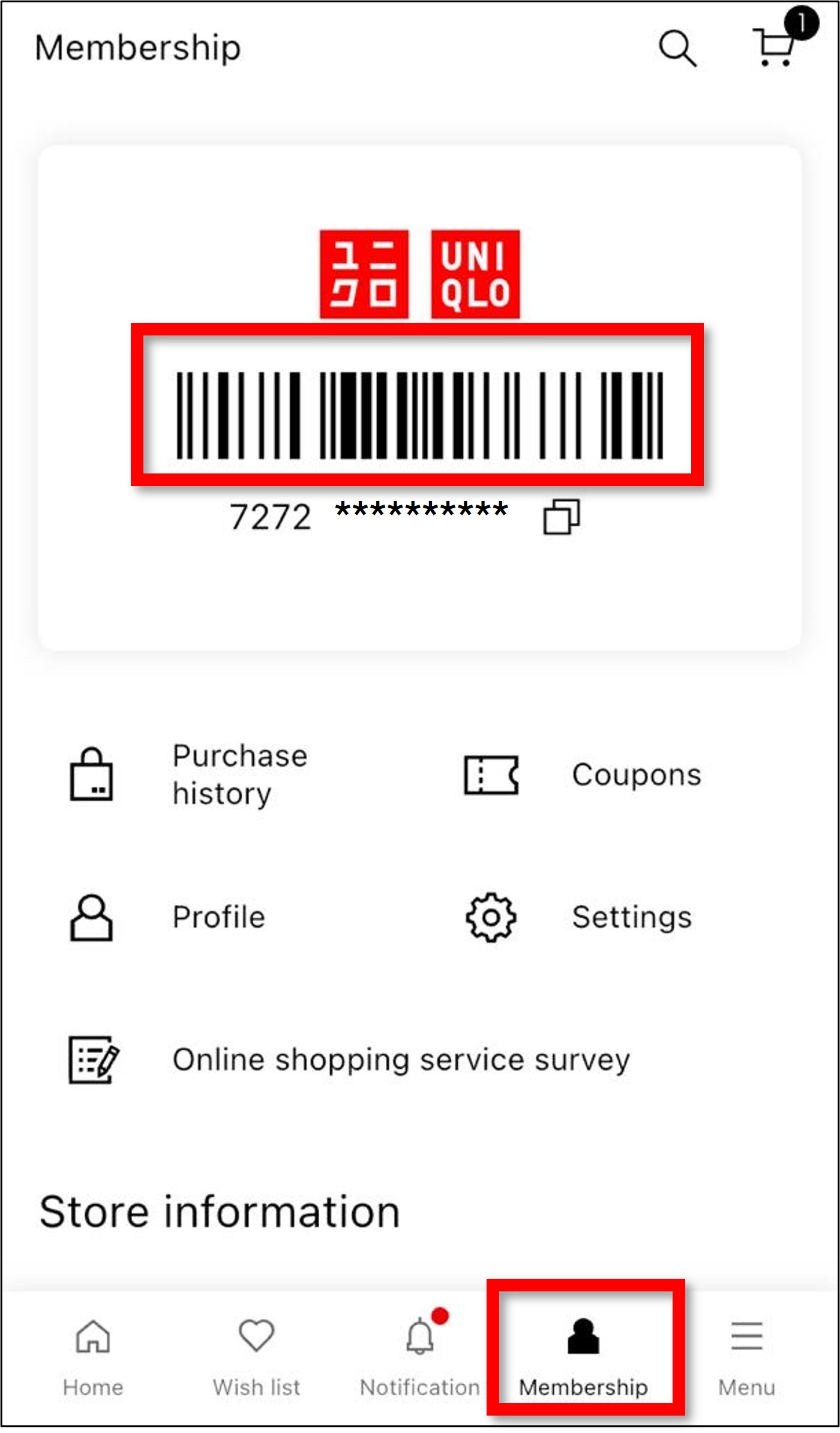
• Go to the membership profile section
• Your barcode will be displayed on the screen .
(Example)
3. Can I get back the same UNIQLO APP membership ID if I change to a new phone?
The UNIQLO APP membership ID will be different and cannot be inherited if you change your phone and login account in your App Store.
Should you have any concerns with your old account, please contact our customer care team via 【Chat Support】 button (bottom page) or email (here) for further assistance.
Should you have any concerns with your old account, please contact our customer care team via 【Chat Support】 button (bottom page) or email (here) for further assistance.
 Suggestion Box
Feedback Submitted
Thank you for your feedback.
We value your opinion and we aim to make our customers happy.
Rest assured, we will use this information to improve our products and services.
Contact UNIQLO Singapore
 CHAT SUPPORT
ChatBot can quickly and efficiently resolve inquiries. Tap the guided options for answers to common questions.
Email
Our Customer Care team will get back to you within the next 24 hours submitted Webform.
Toll-Free Phone Number
Customer Care Operating hours:
Monday - Sunday: 9am - 6pm
(Including Public Holidays)
Monday - Sunday: 9am - 6pm
(Including Public Holidays)
800 321 2015 (Toll-Free)
Customer Care Operating hours:
Monday - Sunday: 9am - 6pm
(Including Public Holidays)
Monday - Sunday: 9am - 6pm
(Including Public Holidays)
Suggestion Box
• Let us know your suggestions and feedback! We wish to improve our products and services based on your comments.
• We do not respond to the suggestions posted in this Suggestion Box but we can help you with your concern through our Customer Center Hotline, Chat Support, or Webform.
• We do not respond to the suggestions posted in this Suggestion Box but we can help you with your concern through our Customer Center Hotline, Chat Support, or Webform.